
Emergency SOS Gadgets vs Safety Apps – What Works Faster?
A phone-snatching incident happens in seconds. You may not even realize what happened until your device is gone. In crowded streets, trains, or public spaces, quick thefts have become a real concern in the UK.
Recent crime data from the Crime Survey for England and Wales shows the scale of the problem. Authorities recorded 2,625,000 theft incidents in a single year. Police also reported 82,678 robbery offenses, which include street theft and phone snatching.
These numbers explain why many people now rely on safety apps and SOS gadgets to protect themselves and their things.
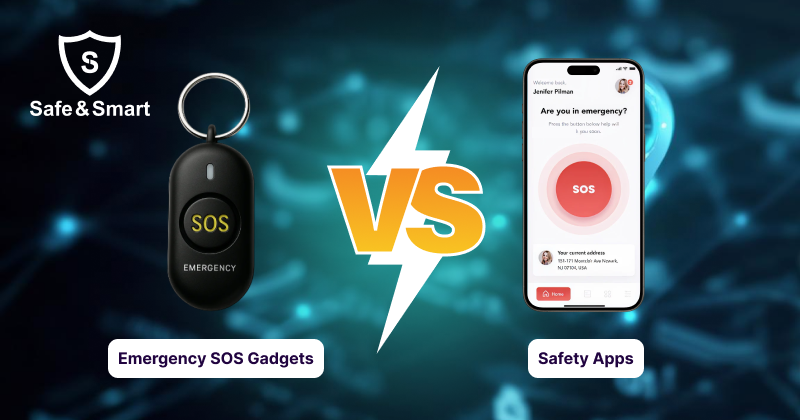
A mobile safety app allows you to send alerts and share your location with trusted contacts within seconds. An SOS gadget gives you a physical button that triggers an emergency alert immediately.
Which solution responds faster when a theft happens?
This blog explains both and compares safety apps, personal safety apps, and SOS gadgets. You will learn how they work and how quickly they respond.
What Are Safety Apps?
Safety apps are mobile applications designed to help people respond during emergencies. These apps run on smartphones and allow users to contact trusted people when they feel unsafe.
A mobile safety app connects your phone with a small network of contacts. When an emergency happens, the app sends an alert along with your location so others can understand your situation.
Many people use personal safety apps during daily travel, late-night meetings, or visits to unfamiliar places. The app gives you a quick way to inform someone when something feels wrong. These apps work through a smartphone interface. You install the app, create an account, and add trusted contacts who can receive alerts during an emergency.
What Are SOS Gadgets?
SOS gadgets are small and personal physical safety devices that send emergency alerts, real-time GPS locations, or calls for help to families, emergency services and monitoring centers when you press a button. People carry these devices on keys, bags, or phones for quick access.
Many people choose SOS gadgets because they are easy to use in sudden situations. For example, if someone tries to grab your bag or phone, pressing a button can be quicker than opening an app. These devices act as a direct safety trigger that works together with a personal safety app.
Comparison Breakdown: Safety Apps vs SOS Gadgets
Safety apps and SOS gadgets both send alerts in any type of emergency, but the main difference is how quickly you can trigger the alert and how the system responds after it. The table shows the differences between these two safety tools.
| Factor | Safety Apps | SOS Gadgets |
| Device type | Mobile application installed on a smartphone | Small physical device attached to keys, bags, or phones |
| Activation method | User opens the app and triggers an alert | User presses a dedicated emergency button |
| Speed of response | Take extra seconds to unlock the phone | Instant trigger |
| Accessibility | Requires an access screen | Easy to reach |
| Usage | Good for planned alerts and monitoring | Useful during sudden incidents |
| Cost | Low, many apps offer free or subscription plans | Higher because users purchase the device and a service plan |
| Functionality | Tools such as GPS tracking, timers, and messaging | Focused tools such as instant alarm and location alerts |
| Reliability | Lower, depending on the phone battery and signal | Higher because the device has dedicated components |
During a stressful situation, such as phone snatching, every second is important. A physical button allows faster reaction because you do not need to interact with the phone screen.
Explore the difference in GPS Tracker for Phone vs. Anti-Snatch Tech for better everyday safety.
Features to Look for in the Best Personal Safety Apps
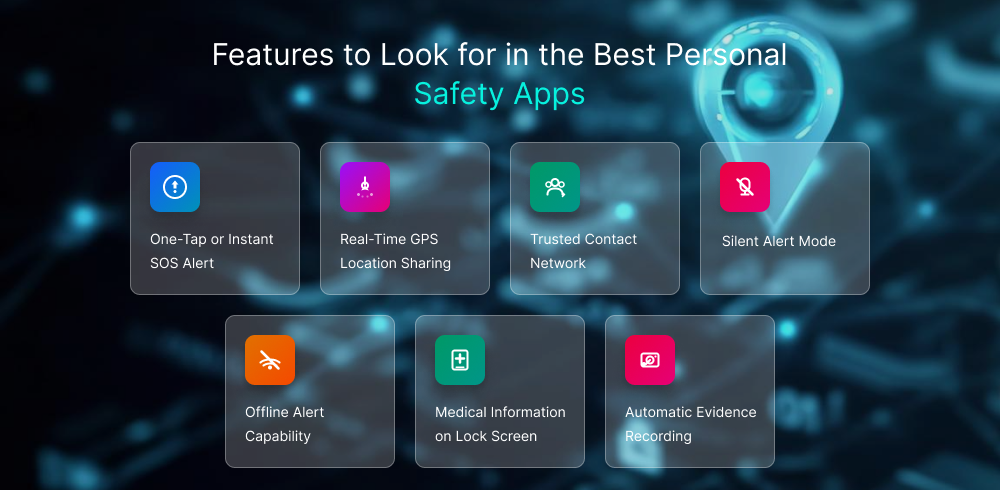
A safety app must help you react quickly during an emergency. The design should reduce steps and make alerts easy to trigger, and personal safety apps should focus on fast alerts, exact and real-time location sharing, and reliable communication with people.
One-Tap or Instant SOS Alert
A one-tap SOS button allows you to send an emergency alert immediately. You should not search through menus during a stressful moment. The alert must trigger with a single action. Your trusted contacts receive the message and your location at the same time. Fast activation helps during incidents such as phone snatching or sudden threats.
Real-Time GPS Location Sharing
Real-time location sharing allows contacts to see where you are. The app sends continuous GPS updates during an emergency and others track movement and understand the situation. Location visibility helps people reach you faster when assistance is needed.
Offline Alert Capability
Mobile networks do not always remain stable. A strong safety app stores the alert when the signal drops. The system sends the alert once the connection returns. This feature stops emergency messages from failing because of poor network coverage.
Trusted Contact Network
A safety system works through trusted people, such as family members, friends, or colleagues who should receive alerts. These contacts receive notifications when the app detects an emergency and help them know your situation quickly.
Silent Alert Mode
Some situations require quiet communication. In that situation, a silent alert lets you send a signal without sound or visible activity on the phone. This helps in situations where drawing attention may increase risk.
Automatic Evidence Recording
Certain safety apps start recording when an alert triggers. The phone captures audio, video, or location history during the incident. This record can help explain what happened and support reports later.
Medical Information on Lock Screen
Some apps have a feature that displays medical information on the phone’s lock screen. Such data includes blood group, allergies, or emergency contacts, and this information helps responders act faster.
Why Do You Need Both to Protect Your Phones or Accessories?
Phone theft usually happens quickly and without warning. Once the device is taken, you lose access to your alerts, contacts, and safety tools.
Relying on a single protection method leads to risk. A safety app alone depends on access to the phone, while smart care products like SOS gadgets provide added backup. If someone grabs the device, you will not be able to trigger the alert. Using both tools creates a layered protection system for your belongings.
For example:
- If your phone is still in your hand, the mobile safety app allows you to send alerts and share your location.
- If the phone is grabbed, the SOS gadget can still trigger the alert through the connected system.
- Trusted contacts receive the notification and understand that something is wrong.
Many people carry smartphones, keys, wallets, and bags together. A safety system that connects these items reduces risk during sudden incidents.
Combining a personal safety app with an SOS device ensures that an alert can still reach your trusted contacts even if one tool becomes inaccessible.
What Works Faster in Real-Life Scenarios?
Speed becomes critical during sudden incidents. A real situation helps explain how different tools perform. Imagine you are standing outside a metro station while checking messages on your phone. A person suddenly grabs the phone from your hand and runs into the crowd. The entire incident lasts only a few seconds.
If your safety system exists only inside the phone, you lose access to it immediately. You cannot open the safety app because the device is already gone.
Now consider a different situation. Your phone sits in your pocket while you walk through a crowded street. Someone tries to pull your bag or reach into your pocket.
If you carry an SOS gadget attached to your keys or bag, you can press the emergency button immediately. The alert triggers without unlocking your phone.
This situation shows how both tools work under different conditions.
- Safety apps work when you still control the phone.
- SOS gadgets work when you need instant access without using the phone.
Many modern personal safety systems combine both tools for this reason. The gadget triggers the alert quickly, and the mobile safety app handles notifications and location sharing after activation. Understanding these scenarios helps explain why many people depend on both tools instead of choosing only one.
How SafeSmartOne Combines Safety Apps and SOS Gadgets
The platform SafeSmartOne connects smart safety devices with a mobile safety app. The goal is to help users send alerts quickly and share their location during emergencies. Devices such as a smartphone case or a safety keychain connect with the app and send alerts when a user presses the SOS button or when unusual movement is detected. After the alert starts, the app warns a trusted contact and shares the user’s location. This system allows the device and the safety app to work together for better protection.
Related Blog: A Complete Guide to SafeSmartOne Safety Devices
Final Thoughts
Safety apps offer a simple way to stay connected during emergencies. They allow you to send alerts, share your location, and inform trusted contacts when something goes wrong. At the same time, sudden incidents can happen very quickly. In those moments, accessing a phone is not always possible. An SOS gadget adds extra protection by giving you a physical button to trigger an emergency alert. Each tool solves a different safety challenge, like safety apps that manage alerts, location sharing, and communication, and SOS gadgets provide quick access during sudden situations. Using both together creates a stronger personal safety setup. The gadget triggers the alert quickly, while the mobile safety app sends the message and location to trusted contacts. This combination helps protect both you and the devices or belongings you carry every day.
FAQs
1. Are safety apps enough to stop a phone snatcher?
Safety apps help you send alerts and share your location with trusted contacts during an emergency and depend on access to your phone. If someone grabs the device, triggering the alert becomes difficult.
2. Who should use a mobile safety app and SOS gadget?
Mobile safety apps and SOS gadgets are essential for students, commuters, travelers, and people who move through crowded public spaces. A mobile safety app and an SOS gadget send alerts quickly and stay connected with trusted contacts.
3. Can safety apps automatically detect danger?
Some personal safety apps monitor movement or unusual activity on the phone. When the system detects a possible risk, it can trigger an alert or prompt the user to confirm the emergency.
4. Can SOS gadgets work if my phone battery dies?
Most SOS gadgets connect to a smartphone to send alerts and share location information. If the phone battery dies, the gadget may not be able to send notifications because the connection with the app stops.
5. Are safety apps reliable for travel?
These apps can support travelers by allowing quick alerts, like emergency alerts, full-time assistance, and real-time location sharing with trusted contacts, and 47 percent of users or travelers feel safer with these apps.